Tags
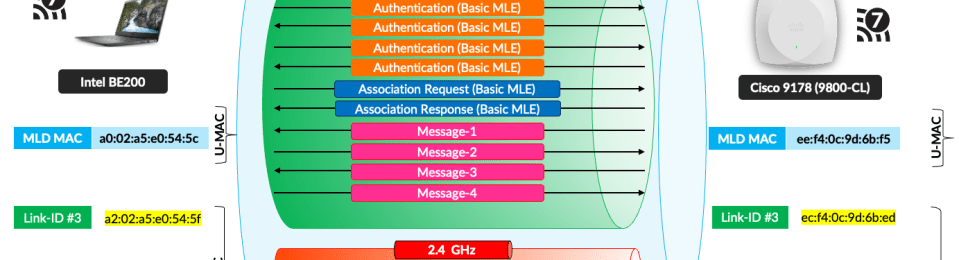
In this post, let’s explore the Multi-Link association process in detail. I captured a PCAP when an Intel BE200 client device associated with a Cisco 9178 AP managed by a 9800-CL controller. The Basic Multi-Link Element (MLE) is included to facilitate the multi-link (ML) setup. However, the client association uses a single link (in this case, the 6 GHz link) and provides information about other links for the ML setup through the MLE.

A client STA discovers the AP MLD through the Multi-Link Element (MLE), which will appear in certain frames in used in the following methods.
- Passive scanning (looking at MLE in Beacon frames)
- Active scanning (looking at MLE in Probe Responses frames)
- Neighbor Report (looking at MLE in RNR element)
- Multi-Link Probe Request/Response
Here is a Beacon frame that includes the Basic Multi-Link Element. Within it, you can see the AP’s MLD MAC address, Link ID, EML capabilities, and MLD capabilities. Note that no station profiles are included, which helps keep the beacon frame size from increasing significantly and prevents excessive airtime usage for beacons. For example, beacon frames are already around 600–700 bytes and are transmitted very frequently, typically every 100 ms.
Note that Link-ID value of 1 is assigned to 5 GHz radio (eg frame #1607) in this instance and you can find Link-ID value 3 for the 6 GHz radio (see 6 GHz beacon frame)

Here are the details of the authentication frame, which includes the AKM Suite Selector and the Basic Multi-Link Element (MLE). In this frame, you can see that the Intel client lists its MLD MAC address. To keep these frames simple, no STA profiles are included.
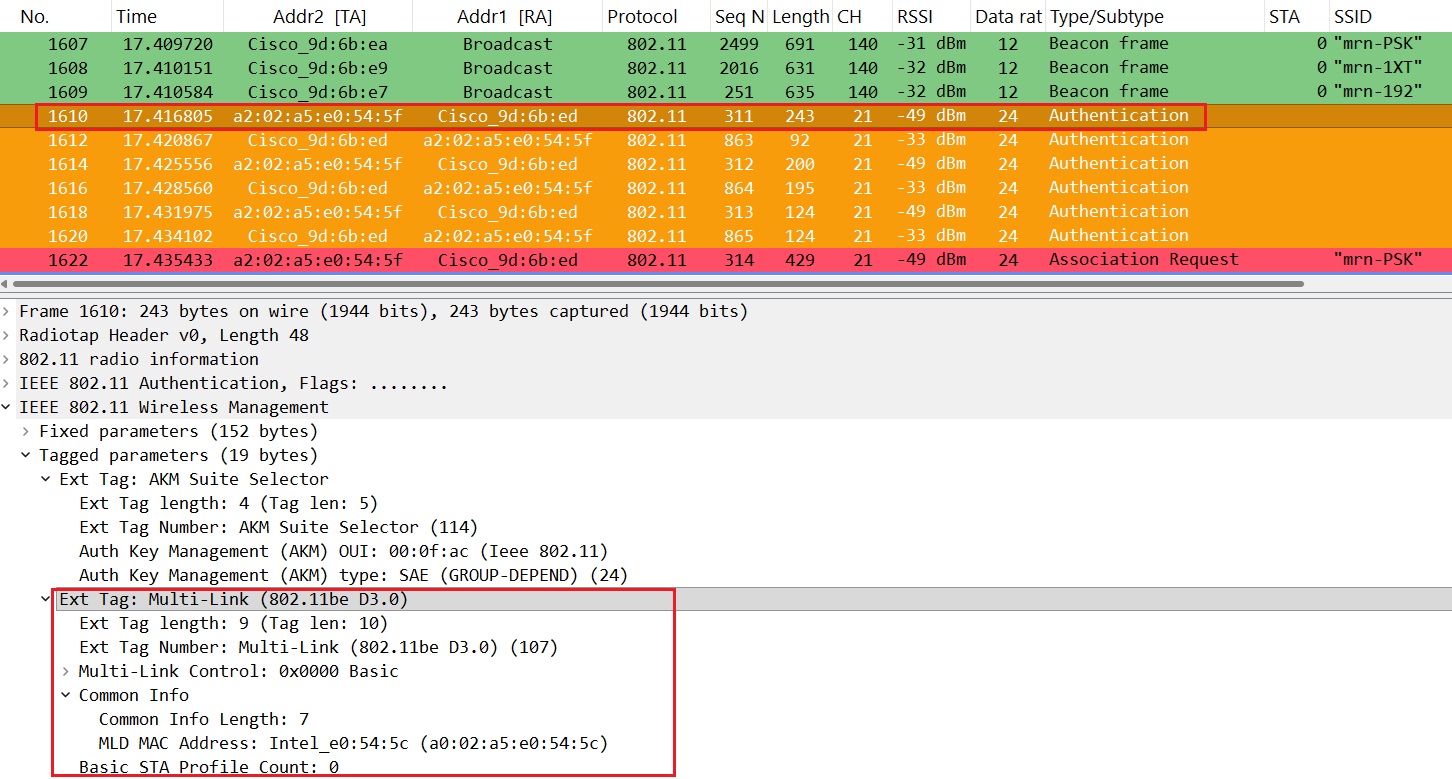
In the above image, you can see six authentication frames instead of the four typically used in the WPA3-Personal security method. If you look closely, you’ll notice that the first authentication frame (#1610) is rejected when client is trying to use 384-bit ECP group 20, and the client station tries again (#1614), listing ‘Rejected Groups’ as an information element & successful when using 256-bit ECP group 19.

To perform MLD-level association, the Basic Multi-Link Element (MLE) is added to both the Association Request and Association Response frames. In earlier cases, you’ll notice that STA profiles are not included—this is done intentionally to keep the frames simple and avoid increasing their size.
A client station can request one or more links for the Multi-Link (ML) setup by indicating those links in the Basic MLE within the Association Request frame. It must provide the capabilities and operational parameters of each link (other than the link used for the Association Request) by adding Per-STA profiles corresponding to each link. Note that the Link ID is 0 (2.4 GHz in this instance) for the attached STA profile, which indicates that the client wants to establish Multi-Link using both 2.4 GHz and 6 GHz (as Association Request in 6 GHz).
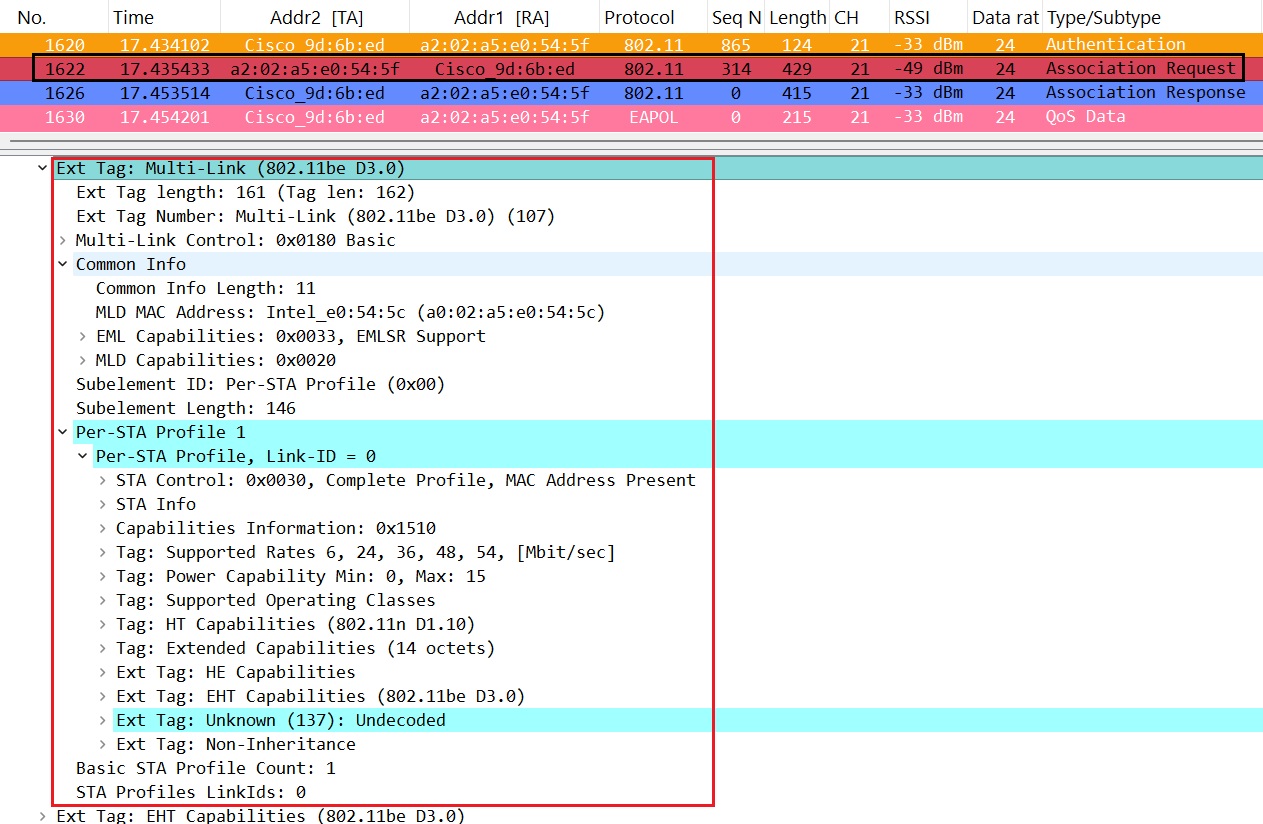
The AP may accept all the requested links or only a subset of them. Details of accepted and rejected links are included in the Per-STA profiles within the MLE in the Association Response frame. In our case, you can see the status code ‘Successful’ within STA Profile 1, indicating that the AP accepted the 2.4 GHz and 6 GHz Multi-Link setup.

After a successful ML setup, the client station will enter power-save mode on all links except the current link used for the Association. Then, the client and AP must go through the 4-way handshake process to derive the encryption keys. There are four different keys required: one for individually addressed data frames and robust management frames, and three for group-addressed traffic
- PTK – For unicast data traffic encryption across any link in the ML setup, the MLD MAC address is used for key derivation so that the same keys can be applied across all links.
- per-link GTK – for broadcast data encryption
- per-link IGTK – for management frame protection
- per-link BIGTK – for beacon frame protection
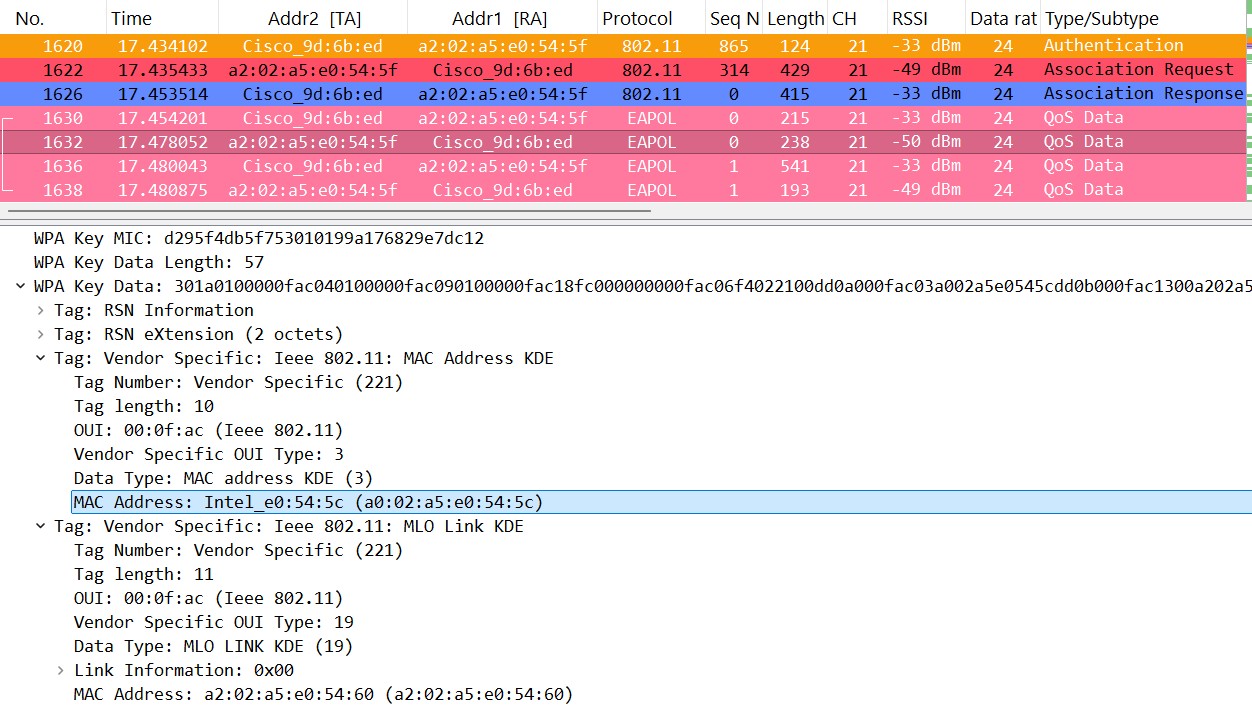
The AP includes its MLD MAC address in M1 and M3, whereas the client device includes its MLD MAC address in M2 and M4. (M1 and M2 messages are shown below). Since key derivation is tied to MLD MAC address, these addresses are included in those 4 frames. Here is the message 1 frame.
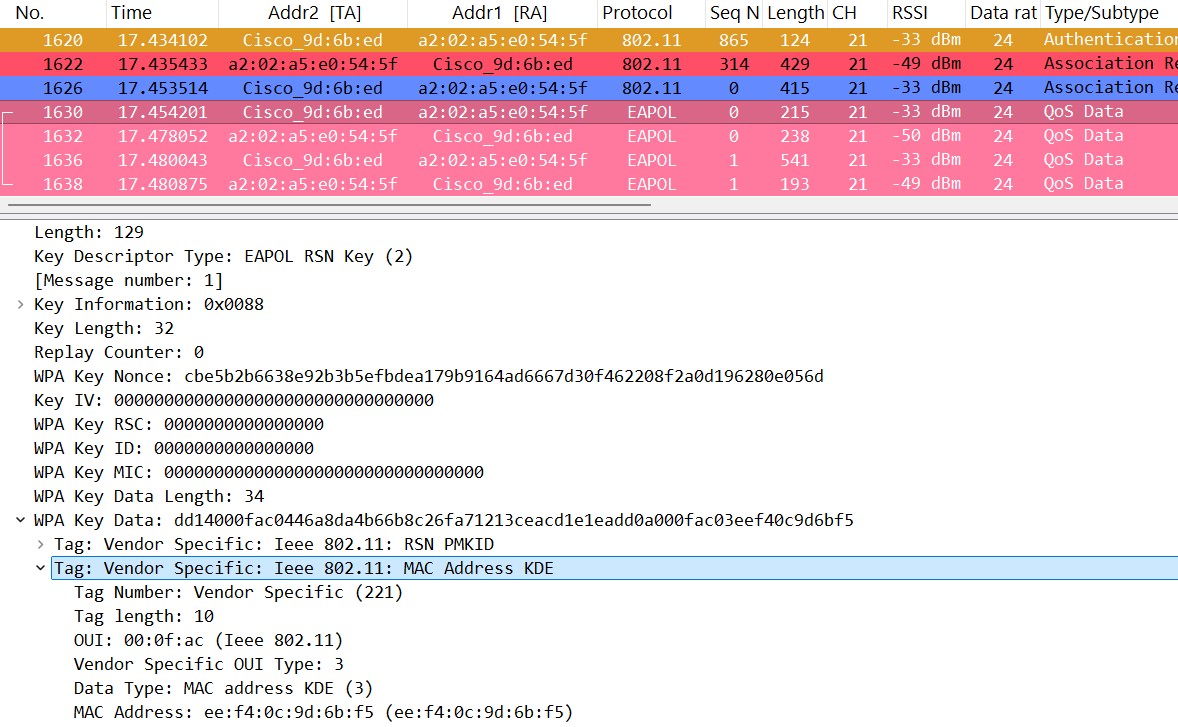
Here is the message 2 frame details.
Here is a video explaining this topic.
I hope this post gives you a good understanding of how Multi-Link Association works in Wi-Fi 7. In future posts, we’ll explore specific topics such as the ‘Multi-Link Element‘, ‘Per-STA Profiles‘, and ‘MLO – 4-Way Handshakes‘.
 mrn-cciew
For frame# 1622(Association Request), I found the “Maximum Number of Simultaneous Links” in MLD Capabilities is zero. Is it wrong?
It is about simultaneous Tx/Rx links, so zero means client devices is saying I can only do simultaneous Tx/Rx across one link (another word it is a single radio device). It may able to do EMLSR (enhanced MLSR)
Why is “Maximum Number of Simultaneous Links” set to 0 in Association Request frame?
This mean client is a Single Radio (SR) device. It can Tx/Rx across one link (given value plus one) simultaneously.
HTH
Rasika
Hi Nayarasi,
In which band we have to capture wireless frames in case of the AP have triband enabled ?
Hi Praveen, You have to capture all 3-bands simultaneously, you never know which band client sending the Association Request in this ML Association.
Rasika
when MLO connection happened , how to confirm what are my active links in wireshark ?
Initial association frame exchanges one of those link, you have to capture 3 channel (if it is tri-band) to pick which link used for it. Depend on the ML capability they can switch traffic between links or send across both links same time.
HTH
Rasika