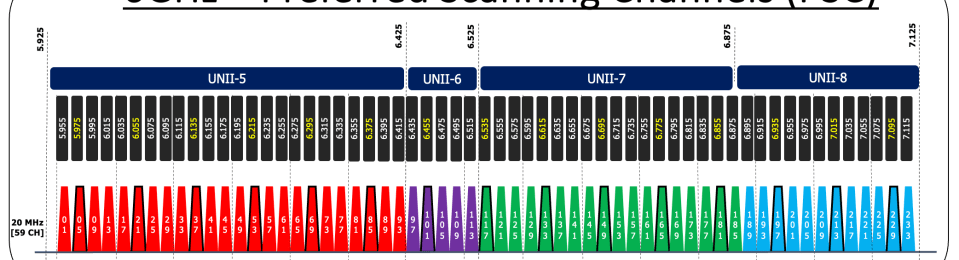
In this post, we will explore PSC – Preferred Scanning Channel, the only active discovery mechanism available in 6GHz. This is another “In-band Discovery” mechanism where 6GHz STA can find 6GHz AP on the same band operation.
The diagram below displays the 6GHz channel allocation, comprising 59 channels (center frequency 5950+5 x CH number) each with a 20MHz width. If a 6GHz client had to probe all these individual channels, it could consume a significant amount of time to discover all 59 channels. Instead of that, we designate 15 channels as PSC (Preferred Scanning Channels). Those PSCs (5,21,37,…) are highlighted in the below diagram. By default, it’s assumed that the AP will be on an 80MHz channel, with the second 20MHz channel serving as the PSC.

Please note that not all regulators worldwide have allocated the entire 6GHz spectrum to Wi-Fi. You can find the updated frequency allocation on the Wi-Fi Alliance website. Most countries follow two trends: some have allocated the entire 1.2GHz (UNII-5, 6, 7 & 8) to Wi-Fi, while others have only allocated the first 500MHz (UNII-5)

In some countries, they have the entire 1.2GHz allocation, which means they have 15x 80MHz channels to use. But in other countries with just 500MHz (UNII-5), they only have 6x 80MHz channels. In these countries, it’s more common to use 40MHz channel width, giving them 12 channels to work with. Because of this, using PSC (Preferred Scanning Channels) isn’t very practical, as there aren’t PSCs for every 40MHz channel. So, PSC isn’t the preferred way to discover in these places. However, in countries with the full spectrum, you might find vendors using PSC for discovery.
In my test setup, I have disabled “PSC Enforcement” on 6GHz RF Profile (RRM > DCA) in Cisco 9800
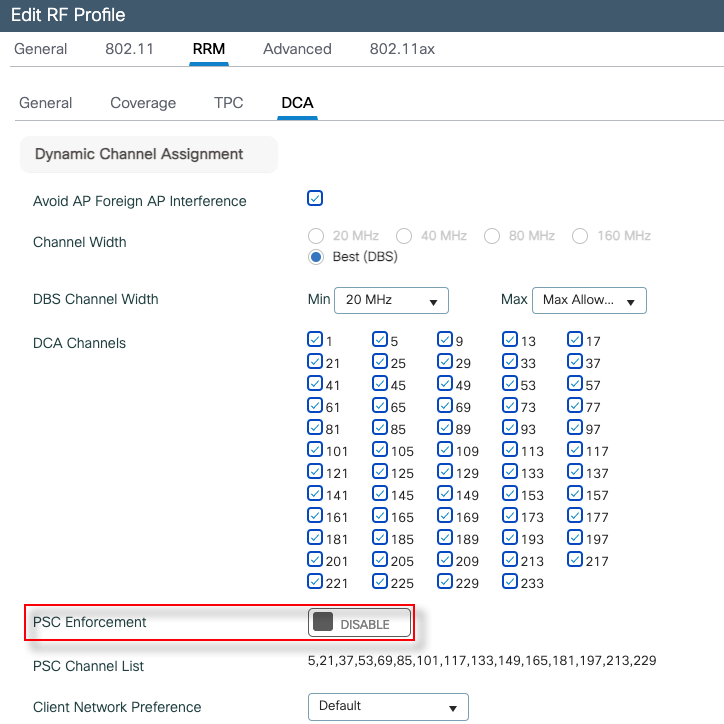
With this setting, I have changed my AP primary channel to channel 49 (not a PSC) & test if client able to discover the AP.
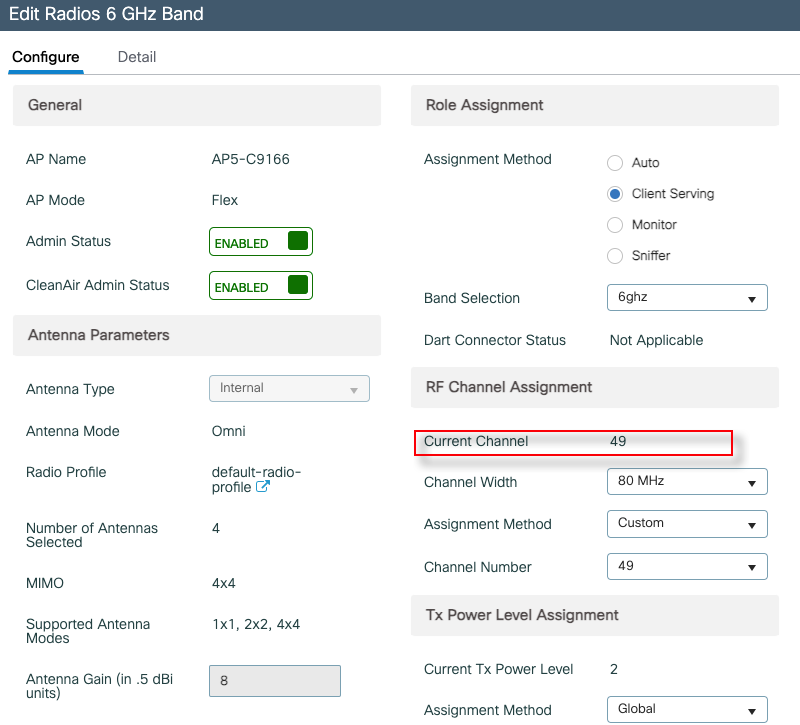
You can verify APs channel setting using the “show ap dot11 6ghz summary” CLI command as well.
C9800-3#sh ap dot11 6ghz summary
* global assignment

AP Name                           Mac Address     Slot    Admin State    Oper State    Width    Txpwr           Channel                             Mode
---------------------------------------------------------------------------------------------------------------------------------------------------------
AP5-C9166                         8c1e.80e5.6260  2       Enabled        Up            80       *2/8 (20 dBm)   (49,53,57,61)                       REAP
With this setting, most of my clients (Netgear USB & Intel AX211) were unable to find the AP. Pixel 6 was able to see the SSID & connect. Here is the PCAP (airtool_C9166_CH49_NoPSC.pcapng) taken in that scenario.
Next, we will change AP’s primary channel to CH53 (one of the PSCs).
C9800-3#sh ap dot11 6ghz summary
* global assignment

AP Name                           Mac Address     Slot    Admin State    Oper State    Width    Txpwr           Channel                             Mode
---------------------------------------------------------------------------------------------------------------------------------------------------------
AP5-C9166                         8c1e.80e5.6260  2       Enabled        Up            80       *2/8 (20 dBm)   (53,49,57,61)                       REAP
With that change, all 3 clients are able to discover AP and successfully connect. Here is the PCAP (airtool_C9166_CH53_NoPSC_1.pcapng) taken in that scenario.
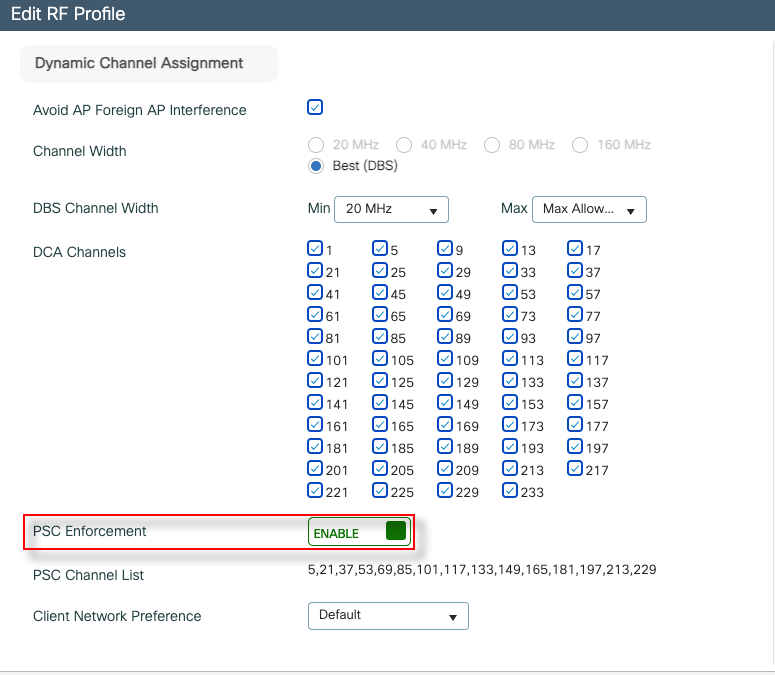
There is a setting in 6GHz RF Profile (under RRM > DCA) named “PSC Enforcement”. I’m not 100% sure what this setting enforces. Below is the contextual help of 9800 WLC provided.
“Enable PSC Enforcement to allow clients to scan only the preferred scanning channels (PSCs). PSCs are a set of 6 GHz channels that are spaced 80 MHz apart. The APs have their primary channels set as PSCs which allows the 6 GHz clients to scan only the PSCs instead of all channels.“
Here is our test setup. Even though I have not shown it here, I got Netgear AP [160MHz – CH5 Primary] and another MR9166 with Meraki [80MHz – CH69 Primary] which advertise 6GHz-only SSIDs.

I wanted to see if clients are actively scanning on these PSC channels. I have used Airtool Multi Source Capture feature with WLANpi M4 and 4x Comfast CF951AX adapters to sniff 5x PSC channels. Only set 20MHz as only interested to see management traffic on the primary 20MHz channel.
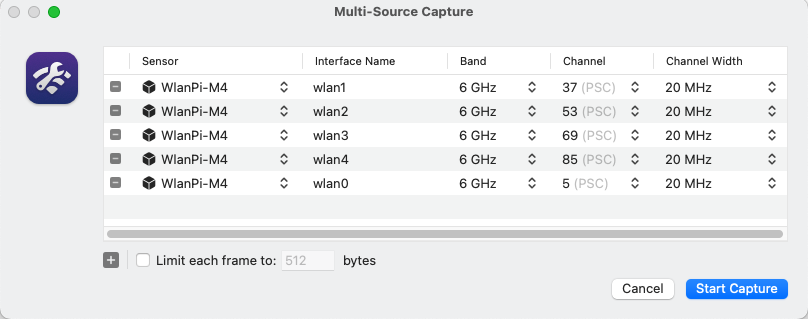
Here is the PCAP (airtool_multi_CH5_37_53_69_85_20MHz_2.pcapng) taken during that testing (95 seconds duration). During this time 3 of my test clients were associated with “mrn-psk” SSID. Here is my Intel AX2111 client Probes seen on CH5, CH53 and CH69
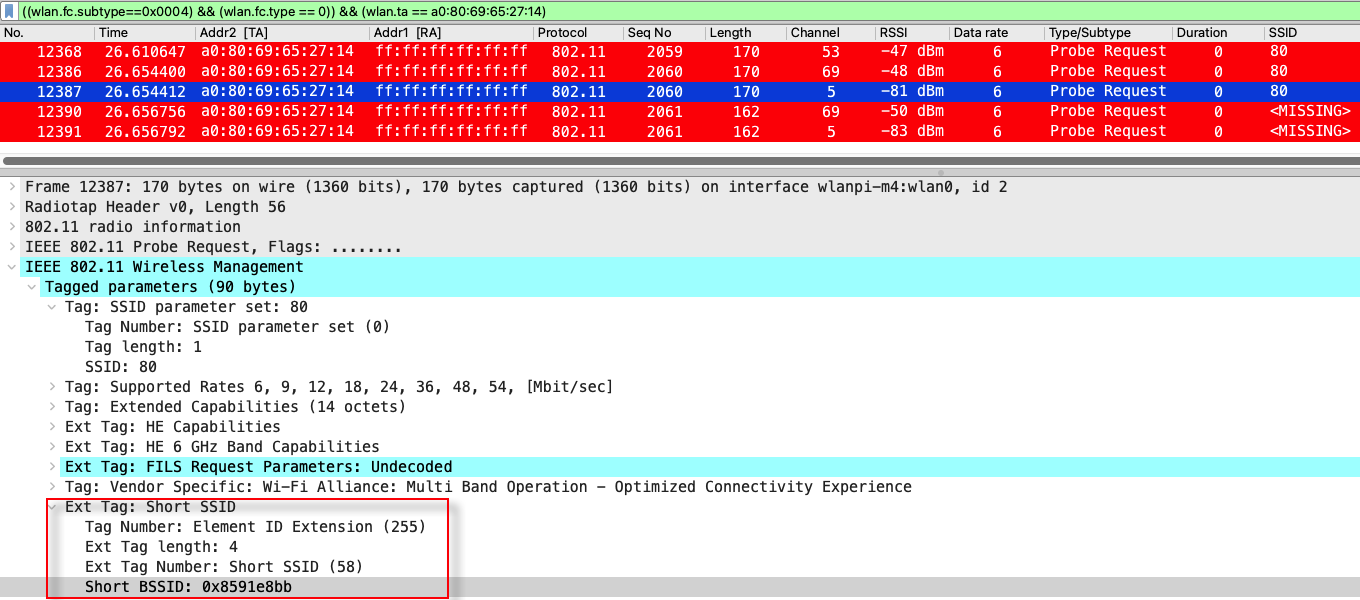
Here is my Netgear (94:18:65:3d:74:7d) Probing behavior. It sends a directed Probe request for “mrn-psk” SSId just before the association and actively sends NULL probes on other PSC channels (CH5 & CH69)

Here is my Pixel6 (fe:5b:ff:5d:38:be) Probe Requests. You can see it is active scanning on CH5, CH37 & CH69 even though it is connected to “mrn-psk” SSID on channel 53.
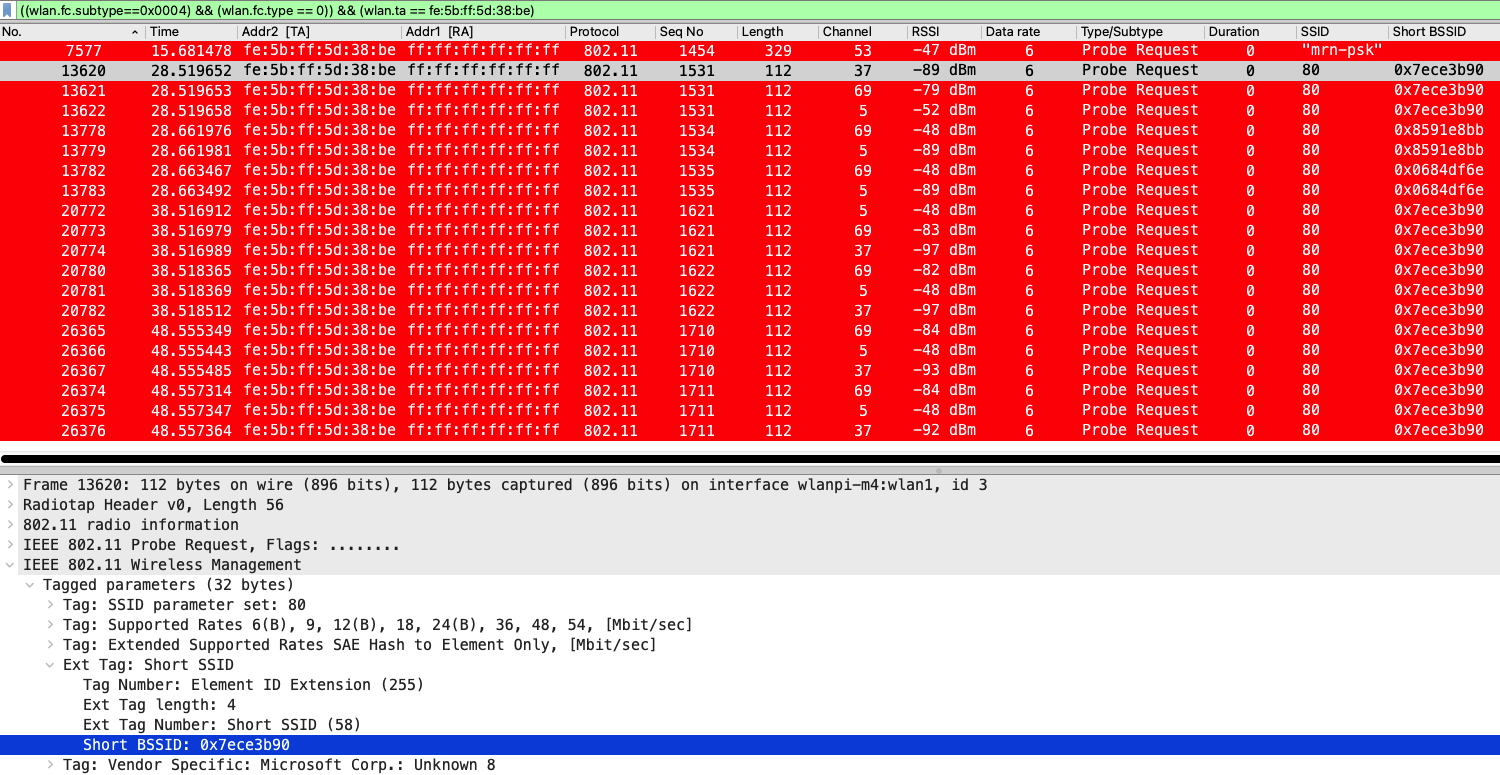
In summary, client devices actively probe only on PSC channels. Therefore, if you have 6GHz-only SSIDs (i.e., legacy band disabled) with the primary channel on a non-PSC channel, your client may not be able to discover the SSID.
In the next post in this “6GHz AP Discovery” series, we will look at Out of Band Discovery – RNR (Reduce Neighbor Report) which is the most common method you will see in the real world.
Update 5-Oct-2023
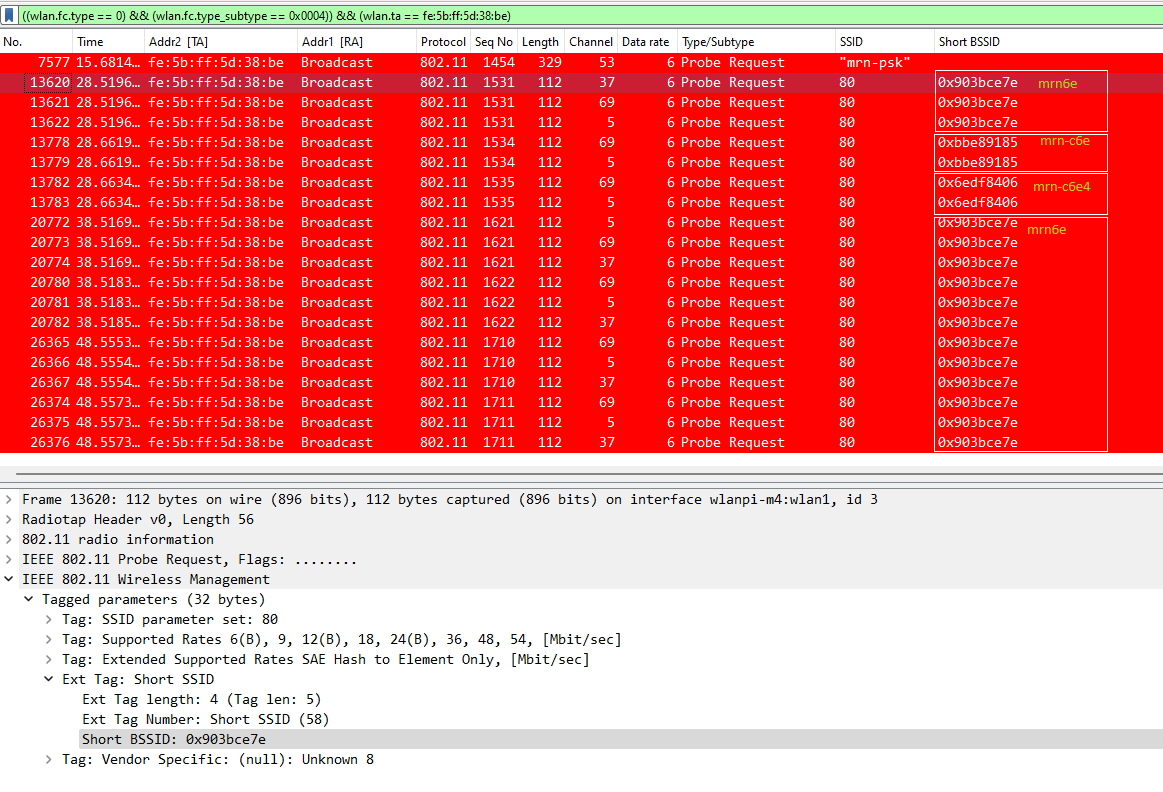
In the above, I have used Wireshark 4.0.8 and that version does not properly interpret Short BSSID field. I have installed v4.1 (development version). By using CRC-32 calculator, you can simply work those short BSSIDs out for my SSIDs (refer to beacon frames for SSID names)
- mrn6e (Short SSID – 903bce7e)
- mrn-c6e (Short SSID – bbe89185)
- mrn-c6e4 (Short SSDI – 6edf8406)
- mrn-psk (Short SSDI – cf3e1aeb)
Here is the Probe Request from the Pixel6 client in Wireshark 4.1
 mrn-cciew
So, if we want to use PSC, than AP has to be 80M BW, right?
What if I wat to use PSC+40M BW or PSC+20M BW, is there a solution?
Yes Joe, If you are using 80MHz channel width then PSC will work without any issues.
If you are using 40MHz or 20MHz deployment then PSC is not the best option.
Note that “out of band” discovery or RNR is the main method of discovery.
Other in-band methods (PSC, FILS and UPR) comes into play for 6GHz only APs (ie on your AP you disabled 2.4/5 GHz which would be corner case). If you have to use a in-band method in 20/40 MHz deployment, I would say FILS discovery is the best among those 3 options
HTH
Rasika
Got it, thank you so much!~