Tags
If you’re planning to deploy Wi-Fi 7 in your enterprise environment with Cisco 9800 WLCs, it’s important to understand which Cisco IOS XE software version provides the features you need. Cisco introduced Wi-Fi 7 access point support starting with IOS XE 17.15.x. However, IOS XE 17.18.3 added a significant enhancement for WPA3-Enterprise security: support for GCMP-256 encryption.
Before IOS XE 17.18.3, WPA3-Enterprise WLANs were limited to CCMP-128 encryption for 802.1X SSIDs. With the introduction of GCMP-256 support, organizations can leverage stronger encryption options that align with the enhanced security capabilities expected in modern Wi-Fi 7 deployments.
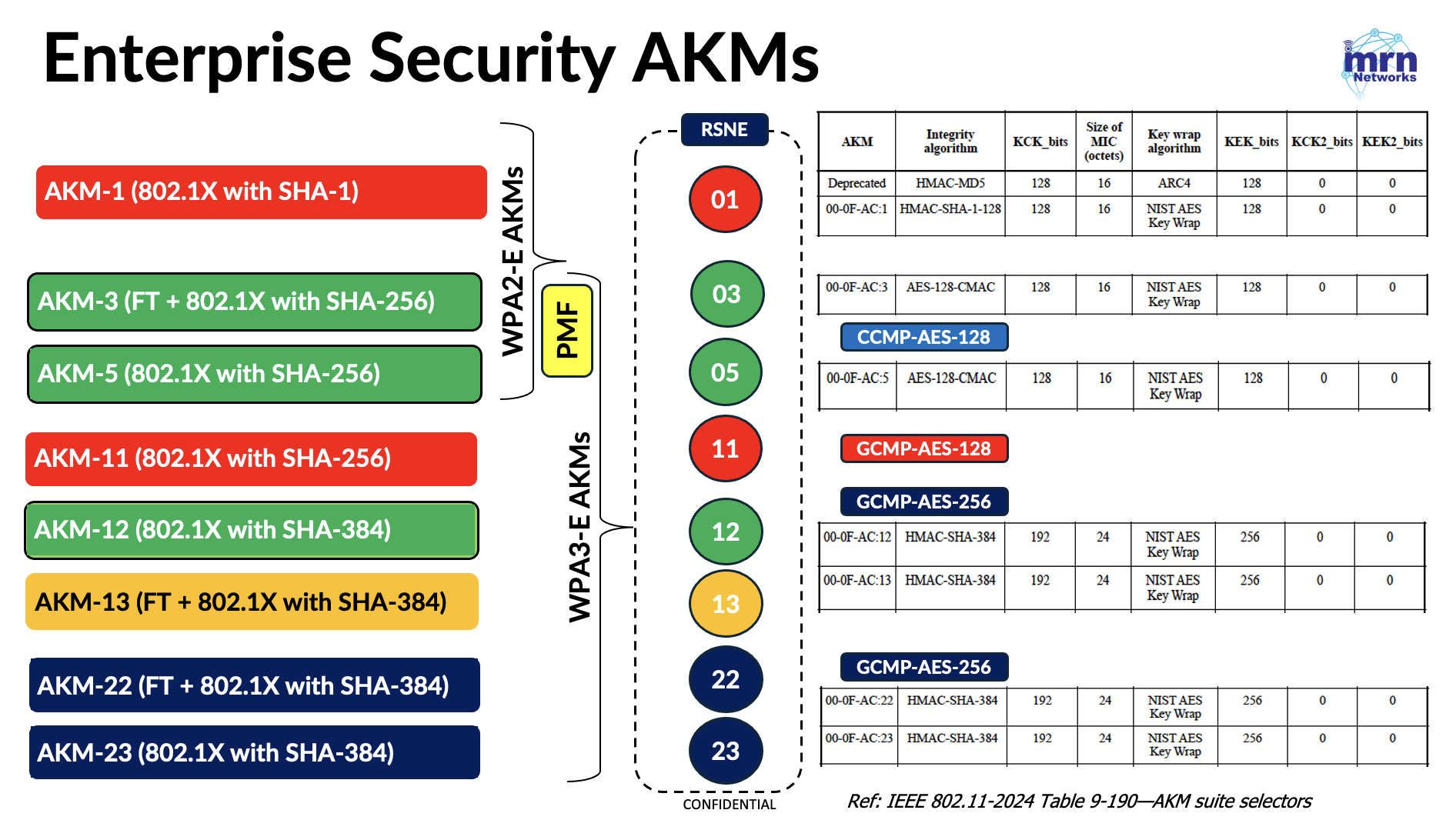
In this post, we’ll explore what GCMP-256 support means for your wireless network and walk through the steps required to configure it on a Cisco WLAN. Here are all the Enterprise security AKMs defined in IEEE 802.11-2024 standard for your reference.
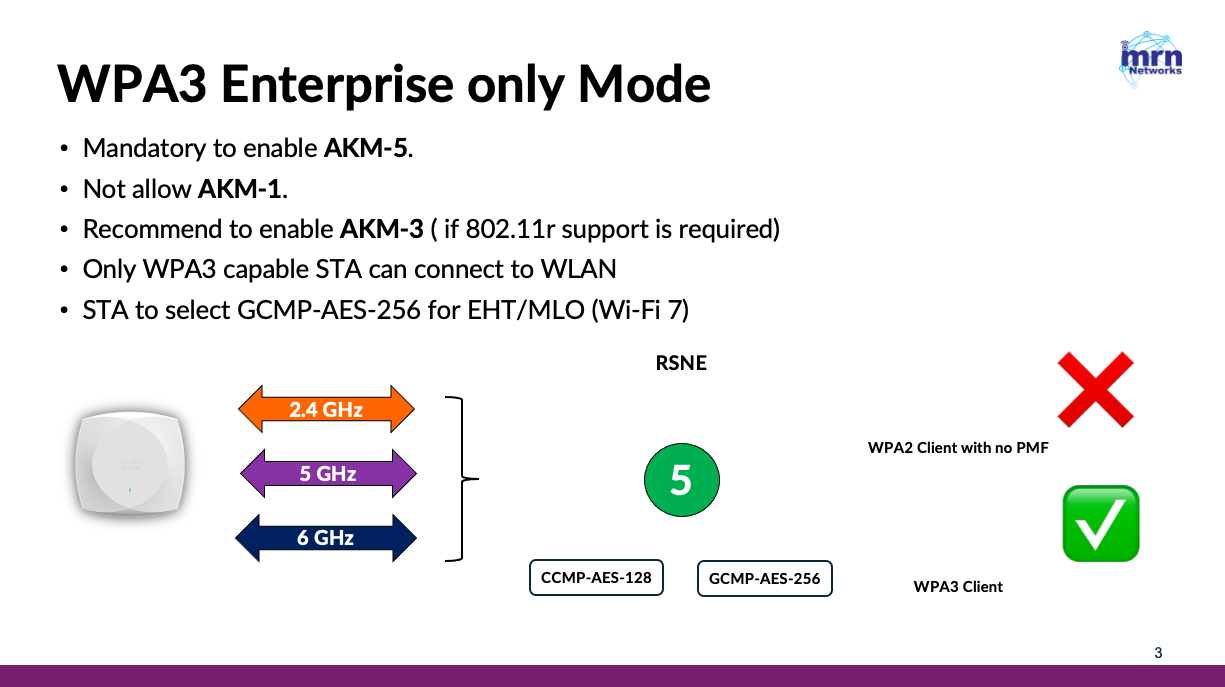
If you have full control over your endpoint devices and do not need to support any legacy 802.1X clients, the best approach is to enable WPA3-Enterprise only on your SSID. This ensures that all clients connect using the strongest available security standards without requiring backward compatibility.
To provide the highest level of security for your Wi-Fi 7 clients, you should enable both CCMP-128 and GCMP-256 under the WLAN’s Layer 2 security settings. This allows capable Wi-Fi 7 devices to take advantage of GCMP-256 while maintaining compatibility with clients that support only CCMP-128.
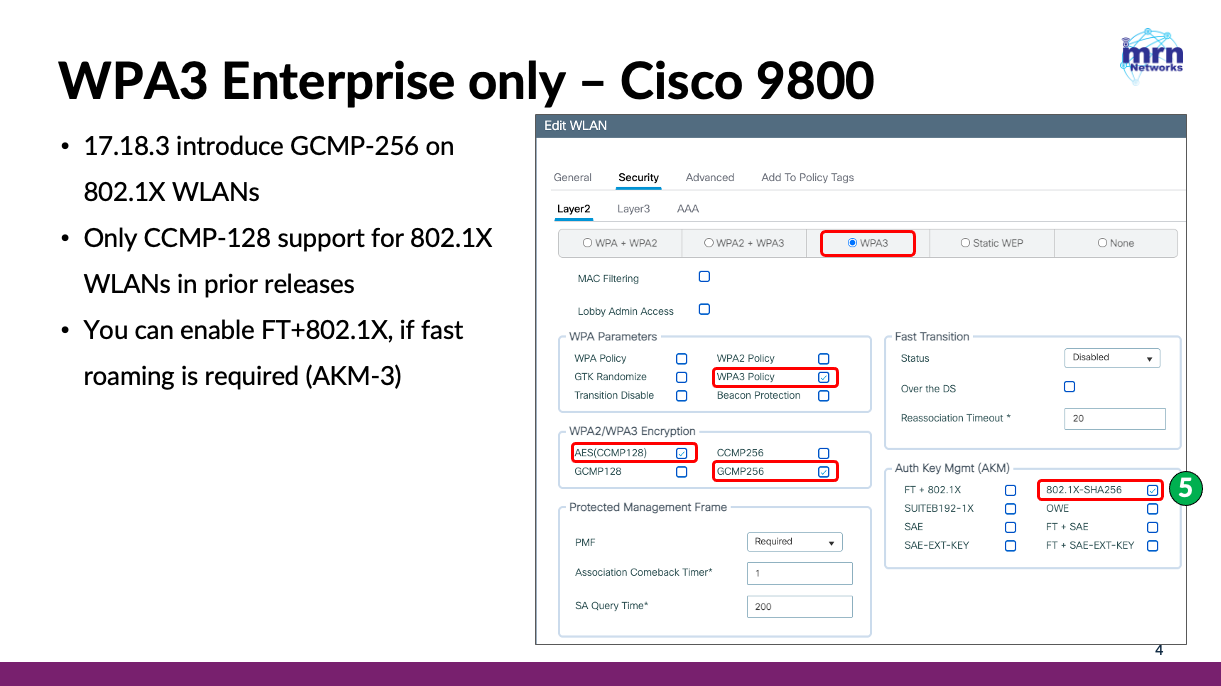
Here is the full configuration of the WLAN. Note that WLAN is configured for 5 GHz + 6 GHz
wlan wp4-1X 4 mrn.1X
 ccx aironet-iesupport
 radio policy dot11 5ghz
 radio policy dot11 6ghz
 scan-report association
 scan-report roam
 no security ft adaptive
 no security wpa wpa2
 security wpa wpa2 ciphers gcmp256
 security wpa wpa3
 no security wpa akm dot1x
 security wpa akm dot1x-sha256
 security dot1x authentication-list MRN1X
 security pmf mandatory
 no shutdown
With this configuration in place, let’s test a variety of Wi-Fi 7 clients to see which devices can successfully establish a Wi-Fi 7 connection using Multi-Link Operation (MLO) and which clients fall back to a traditional single-link connection. Understanding these differences will help you validate client compatibility and ensure you’re getting the full benefits of your Wi-Fi 7 deployment. I have used following Wi-Fi 7 clients in this test.
- Macbook Pro (M5) – Version 26.6.1 (25G76)
- Qualcomm FC7800 – driver 3.1.0.1571 (windows 11 25H2 26200.8973)
- Netgear A9000 – driver 5.3.0.3230 (windows 11 25H2 26200.8973)
- Apple iPhone16 – iOS 26.6
- Google Pixel 8 – Android 17
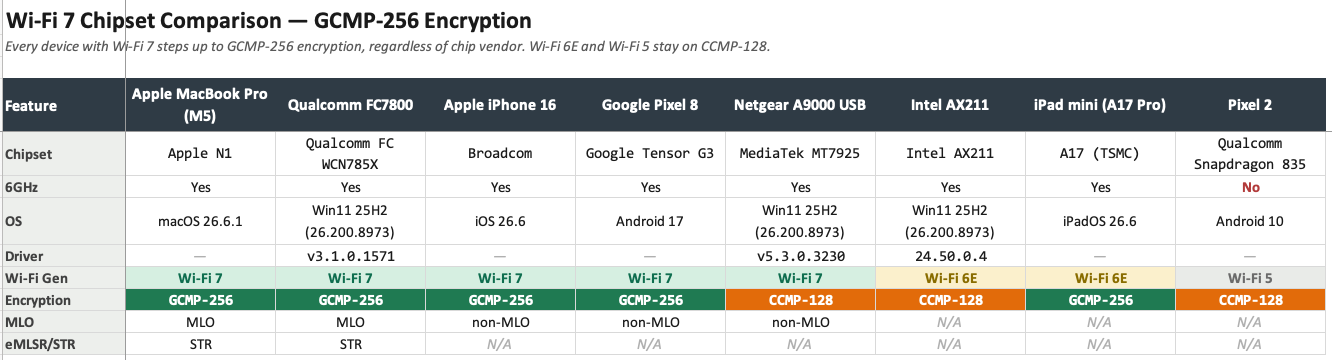
I have tested with Wi-Fi 6/6E (Intel AX211, iPad mini) and Wi-Fi 5 (Pixel 2), and all of them are able to connect to WPA3 Enterprise. Apple iPadmini (A17Pro) supported GCMP-256 and others supported CCMP-AES-128.
If you need to support legacy 802.1X clients on this SSID, you must enable WPA3-Enterprise Transition Mode. This allows both WPA3-capable clients and older WPA2-Enterprise clients to connect to the same WLAN. To support this mixed-client environment, modify your WLAN configuration as shown below.
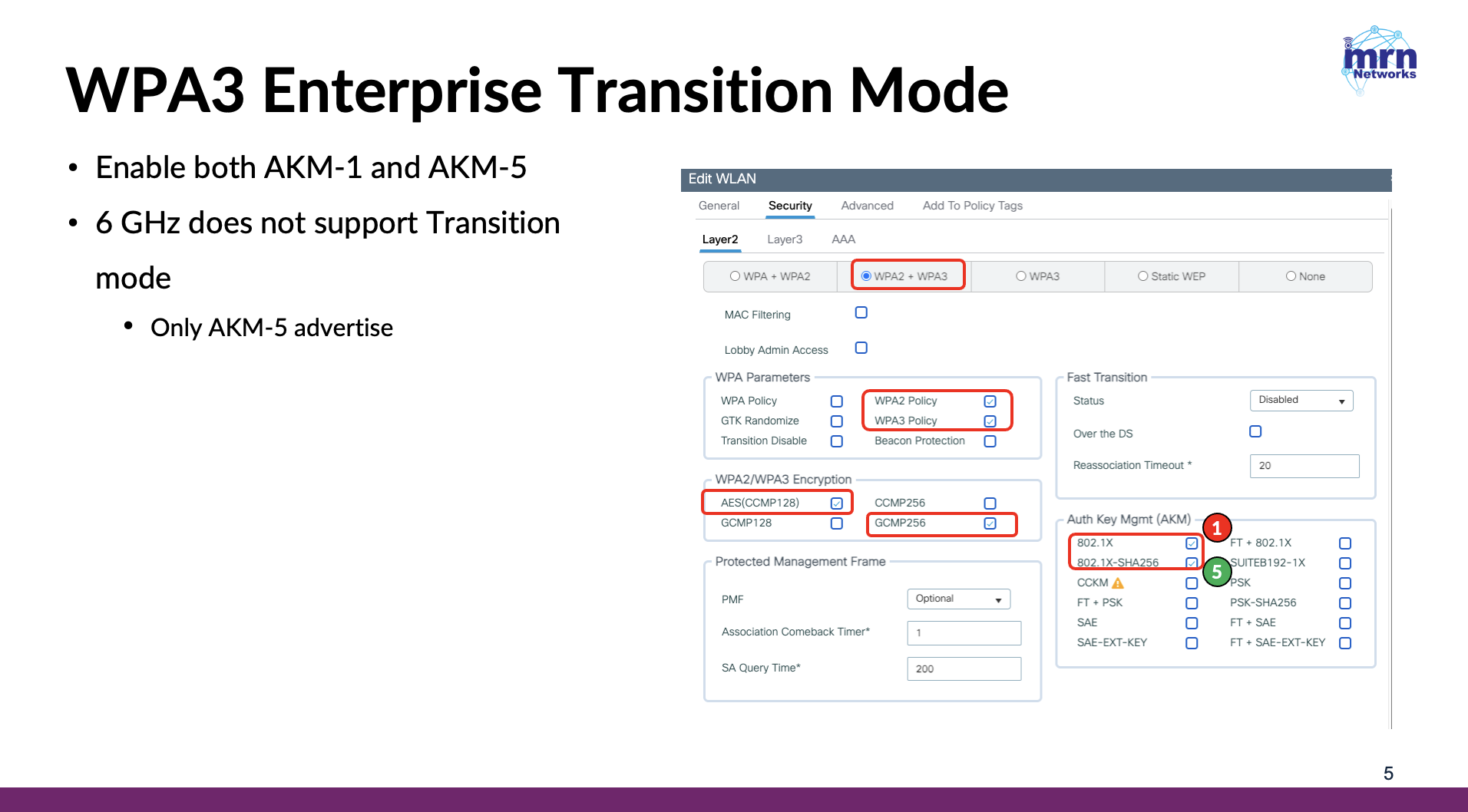
This configuration maintains compatibility with legacy devices while still allowing newer clients to benefit from the enhanced security features available with WPA3.
There are a few things you should be aware of before upgrading to 17.18.3 and enabling GCMP-256 for your Wi‑Fi 7 deployment.
Since software releases 26.1.x do not support GCMP-256, any WLAN configured with GCMP-256 will be automatically disabled if you upgrade from 17.18.3 to 26.1.x versions. It is clearly documented in the release notes
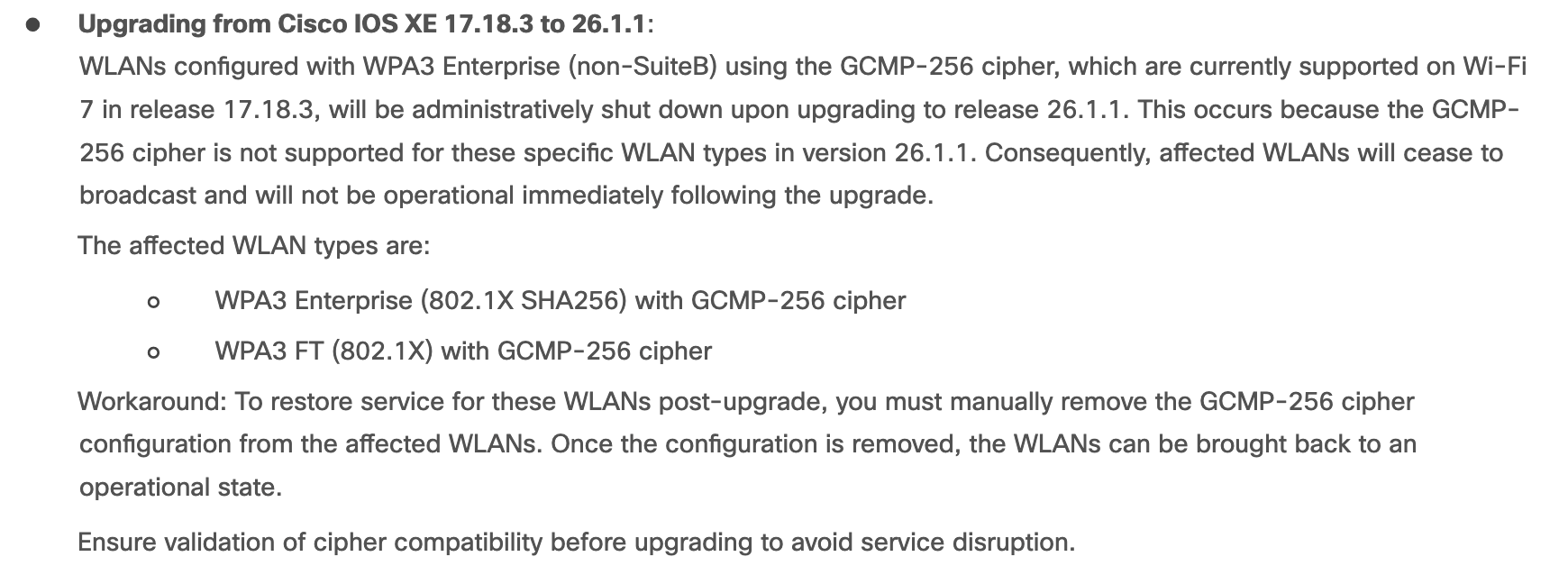
After the upgrade, you must manually remove the GCMP-256 configuration and re-enable the affected WLANs. Hopefully, future software releases 26.2.x will add support for GCMP-256, allowing seamless upgrades without impacting existing WLAN configurations.
Another thing to note is that the Cisco 9105, 9115, and 9120 series APs do not support GCMP-256. Therefore, if you have any of these AP models in your deployment, you should test their behavior before enabling GCMP-256 on the WLAN.
Finally, if you are managing your 9800 controllers through Catalyst Center, it appears that the GCMP-256 configuration option is not yet available. I’m sure this capability will be added to Catalyst Center templates in the near future.


Sounds easy unless you are configuring the controller via DNAC !
Hi Charles, yes, it seems customers who manage 9800s via Catalyst Centre have to wait a bit. I understand the frustration.