Tags
After a long wait, Apple has finally added Wi‑Fi 7 support to its Mac lineup with the M5‑based MacBook Air and MacBook Pro. However, when compared with other Wi‑Fi 7 solutions—such as the Intel BE200 or Qualcomm FastConnect 7800—Apple’s N1 Wi‑Fi chip comes with notable limitations. It is restricted to 160 MHz channel bandwidth (instead of 320 MHz) and supports only 1024‑QAM, corresponding to MCS 10 and 11 carried over from 802.11ax. Support for MCS 12 and 13, introduced with 802.11be, is notably absent.
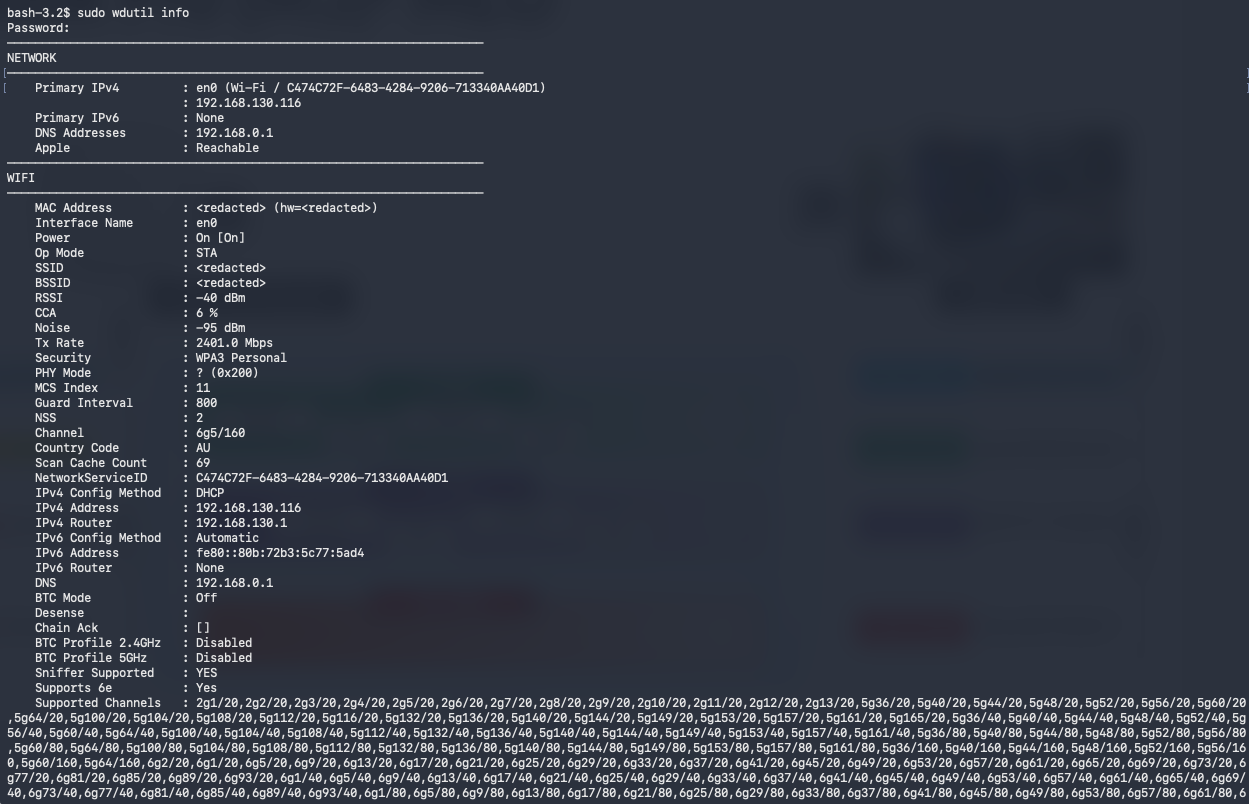
You can use the Apple Wireless Diagnostics Utility (wdutil) CLI command to get more detailed information about your MacBook’s Wi‑Fi interface. Here is a very good piece of documentation that explains it in detail. Open the Terminal app run ‘sudo wdutil info‘ to get the output shown below. PHY mode (0x200) is for 802.11be. Even though this output indicates support for Sniffer mode, note that the AirTool 2 application still does not work with the Apple N1 chip. As a result, you are limited in your ability to capture PCAP files using the AirTool application. Here is Adrian confirmation on a LinkedIn post.
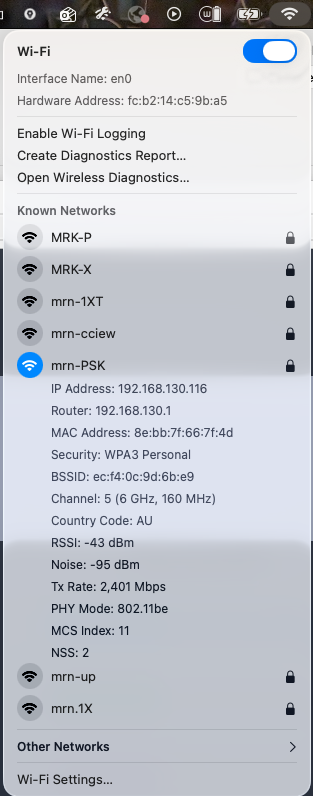
You can also get basic information by clicking the Wi‑Fi icon while holding the Option key. From here, you can view the MacBook’s MLD MAC address, PHY type, MCS index, and NSS details. You can see it is connecting using 802.11be, still no clear indication if that is MLO connection or not.
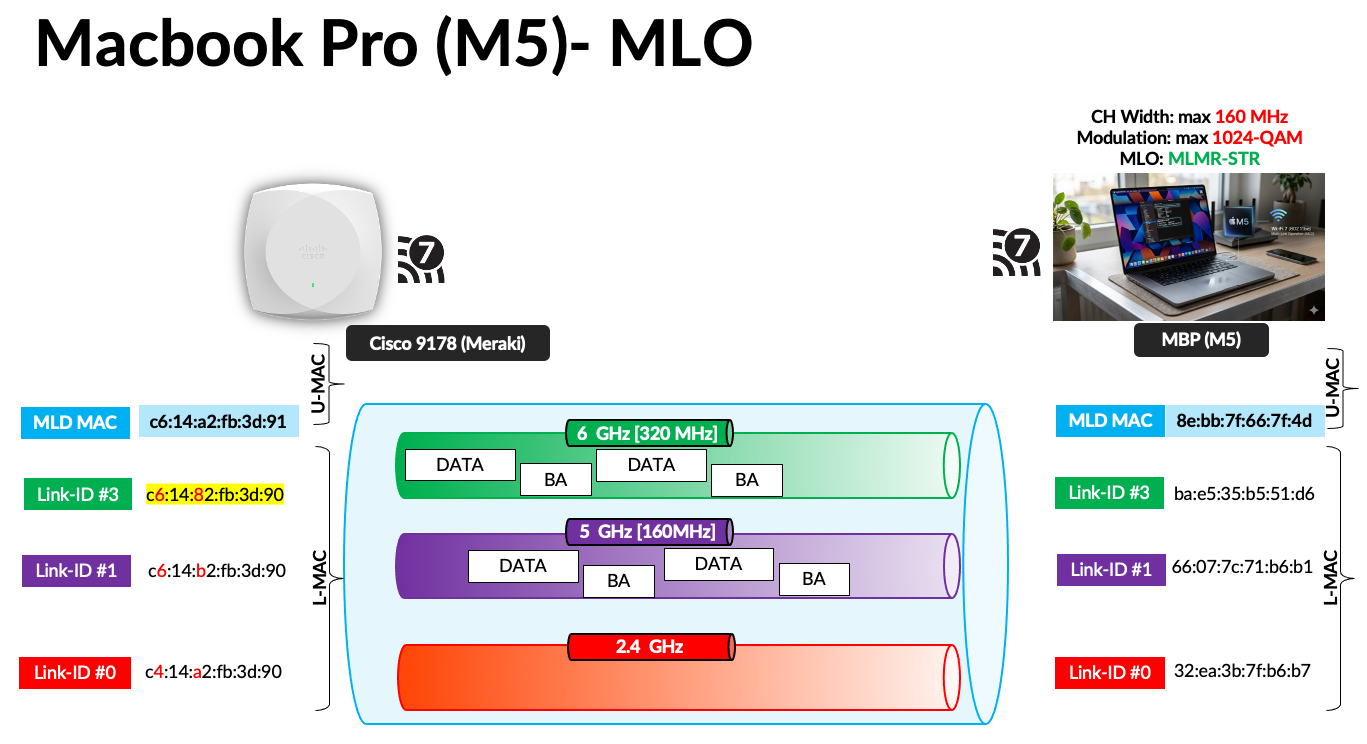
By referring to mcsindex.net, you can confirm that a data rate of 2402 Mbps corresponds to two spatial streams (2SS) using MCS 11 with a 160 MHz channel. In my testing with the Speedtest application, I did not observe the Apple client load‑balancing traffic across the 5 GHz and 6 GHz links. In my testing I have configured Cisco 9800 managed 9178 AP with WPA3-Personal SSID (mrn-PSK) for 5GHz and 6GHz (with 160MHz and 320MHz channel bonding).
If MCS 13 were supported, the expected PHY rate would be 2882.4 Mbps with a 160 MHz channel, and 5764 Mbps with a 320 MHz channel, as seen with clients such as the Intel BE200 or Qualcomm FastConnect 7800.
Here are the two PCAP files captured during my testing. You should be able to filter Apple MacBook traffic in the MRK-9800-MBPM5-56GHz-MLO-2.pcap file using the following display filter:
wlan.addr == ba:e5:35:b5:51:d6 && not wlan.fc.type == 1
You can see Apple client indicating it is MLMR-STR capability with max simultaneous links value set to 1. (indicating it can send traffic across 2 links simultaneously)
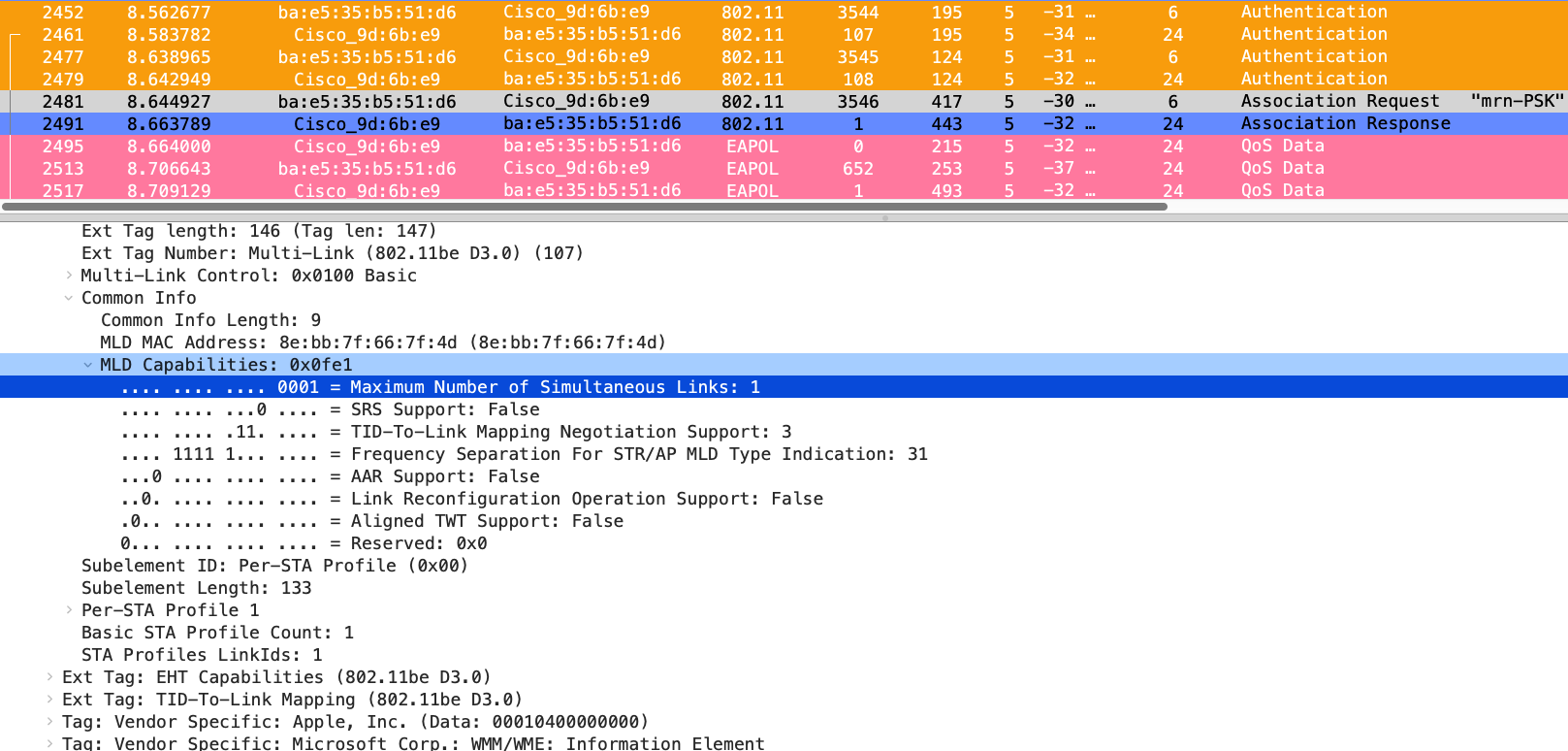
Although I did not observe my Speedtest traffic using both links simultaneously, additional testing is required to determine whether the client load‑balances traffic across the two links when multiple applications are in use.


According to the „Simultaneous Transmission (Intermod[ulation]) Test Report“ published by the FCC each of the models MacBook Air M5 (13-inch and 15-inch), MacBook Pro M5 Pro (14-inch and 16-inch), and MacBook Pro M5 Max (14-inch and 16-inch), introduced in March 2026, support simultaneous transmission of
WLAN in the 2.4 GHz band + WLAN in the 5 GHz band and
WLAN in the 2.4 GHz band + WLAN in the 6 GHz band.
Additionally that report gives results for simultaneous transmission of 5 or 6 GHz WLAN + 2.4 GHz Bluetooth,
5 or 6 GHz WLAN + Thread,
5 GHz Narrowband + 2.4 GHz WLAN.
However the SAR Test Reports for those models, published in the collection of the FCC documents as well, only give results for the simultaneous transmission of WLAN and Bluetooth and so on. This may be an error.
The latter kinds of simultaneous transmissions are already known from those models of the MacBook Pro that do not support 802.11be.
MLMR-STR would also require simultaneous transmission and receive in different frequency bands of course. Apple’s own document „Wi-Fi and Ethernet specifications for Apple devices“ (version March 26, 2026) does not talk about the details of the implementation of MLO, nor is it the purpose of the test reports published by the FCC to do so, and Apple stopped submitting devices to the Wi-Fi Alliance certification process in 2012.
Attention! The MacBook Pro „14-inch M5“, introduced in October 2025, does not support 802.1be. Only 802.11ax with support for the 6 GHz band (Wi-Fi 6E) is available there.