If you’re a network engineer, ask yourself: how confident are you in Wi-Fi packet capturing for client troubleshooting?
Have you ever found yourself in a situation where you wished you knew how to capture packets effectively — and more importantly, interpret what’s happening over the wireless (or even over the wire in some cases)?
This is a critical skill every network engineer should have, yet I’ve noticed that many aren’t fully confident when it comes to this task.
In this post, I’m going to list multiple methods you can use to capture Wi-Fi packets. While I’ve covered some of these techniques in previous posts, they’ve been scattered — so this is your one-stop guide. Bookmark it, share it, and help someone else pick up this essential skill.
| Reference Blog Post | YouTube Video | |
| Mastering Wi-Fi PCAP – Intro | You are reading that blog 🙂 | 10 min Video |
| How to use my Wireshark Profile | Get Rockstar Wi-Fi Profile | Video – 28 min |
| L1: How to capture Wi-Fi packets on Mac? | Wi-Fi PCAP in mac OS -AirTool | 7 min Video |
| L2: Multi-channel Wi-Fi PCAP with mac OS | Multi-Channel PCAP – AirTool + WLANPi | 9 min Video |
| L3: Wi-Fi PCAP with Windows OS (CommView) | Wi-Fi PCAP with Windows OS (CommView) | 10 min Video |
| L4: Wi-Fi PCAP with Windows + WLANPi | Windows Wi-Fi PCAP with WLANPi | 5 min Video |
| L5: Wi-Fi PCAP with Linux | Wi-Fi PCAP with Linux | 14 min Video |
| L6: Wi-Fi PCAP with Ekahau SK2 | Wi-Fi PCAP with Ekahau | 10 min Video |
| L7: Wi-Fi PCAP with Sinffer AP | 1. Sniffer mode PCAP (AireOS) 2. Sniffer mode PCAP (9800) | 24 min Video |
| L8: Wi-Fi PCAP with Meraki | Wi-Fi PCAP with Meraki | 17 min Video |
| L9: Wi-Fi PCAP with Juniper Mist | Wi-Fi PCAP with Mist | [Video – x min] |
| L10: Wi-Fi PCAP with Ubiquiti | Wi-Fi PCAP with UniFi | 10 min Video |
| L11: Wi-Fi PCAP with Cisco Catalyst Centre | [Video – x min] | |
| L12: Wi-Fi PCAP with Cisco 9800 WLC | 1. Wi-Fi 7 PCAP on Cisco 9800 2. Cisco 9800 Packet Captures | 42 min Video x min Video |
Here’s a summary of the methods I plan to cover. Please note that I don’t have access to all the tools needed to demonstrate each vendor’s products and their capabilities. If I’ve missed any common methods, feel free to leave a comment and share a reference link so others can learn from it as well.
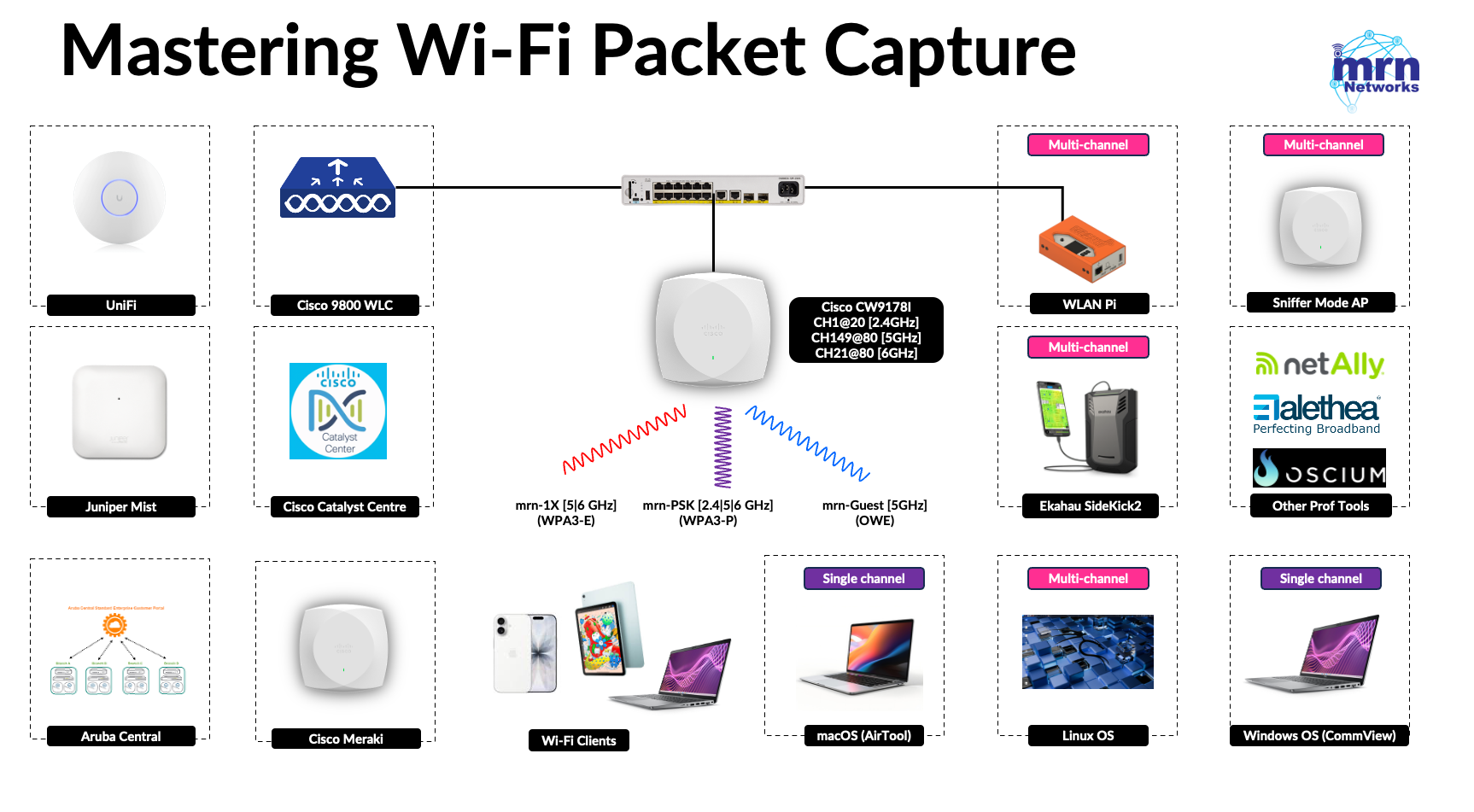
I hope this blog post, along with the series of short videos, helps you enhance your Wi-Fi troubleshooting skills.
 mrn-cciew
Good technical content
Thank you Prathap
Thank you so much!! this information is exactly what I needed!
Love it! ❤
Thank you so much!! this is exactly what I need!!
Let me practice! ❤
You are welcome. Let me know any challenges or feedback once you go through these videos.
Regards
Rasika